
Disastrous Mistakes That Cause Bluetooth Selfie Sticks to Snap During Travel
Traveling only to watch your selfie stick snap in half and your phone screen shatter is a true disaster. Learn about the disastrous mistakes that easily break Bluetooth selfie sticks and how to choose the highest quality product.
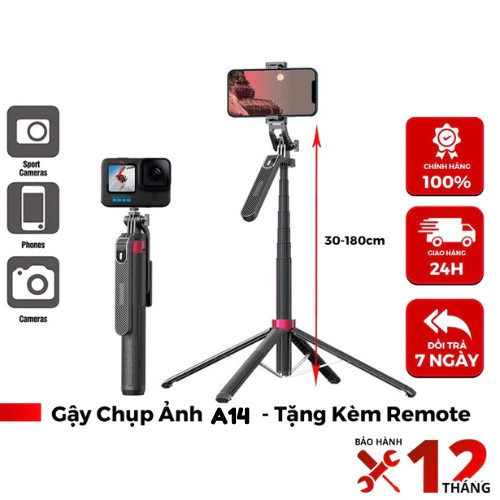
Traveling, checking in, and capturing stunning moments with family and friends are essential needs for anyone. To get wide angles that capture the majestic natural scenery, a Bluetooth selfie stick is an indispensable "companion." However, quite a few people have experienced comical yet frustrating situations: sticks snapping in half and phones free-falling from cliffs to the ground simply because of extremely foolish mistakes.
In this article, we will dissect the disastrous mistakes that cause Bluetooth selfie sticks to snap while traveling, while also equipping you with the experience to select and use this device safely and durably.
1. Top 5 Disastrous Mistakes That Easily Break Bluetooth Selfie Sticks When Traveling
Mistake 1: Being cheap and buying unbranded "street market" selfie sticks
Many people have the mindset, "I only travel a few times a year, why waste money on an expensive selfie stick?" As a result, they choose cheap sticks costing only tens of thousands of VND sold widely on sidewalks or unreliable e-commerce sites. These sticks are usually made of brittle, thin recycled plastic, with loose aluminum tubes that easily deform after just a few extensions and retractions. When mounting heavy smartphones weighing 180g - 230g, the sticks are prone to overloading and snapping immediately.
Mistake 2: Exceeding the allowable weight capacity of the stick
Each Bluetooth selfie stick model has its own weight limit (usually ranging from 150g to 500g). The disastrous mistake of many young people is mounting super-heavy phones plus bulky phone cases, or even attaching mini LED lights, external microphones, or auxiliary lenses. Excess weight beyond the bearing capacity causes plastic joints to crack, directly threatening the safety of an expensive phone.
Mistake 3: Fully extending the stick in strong winds
When taking pictures in windy places like beaches, mountain peaks, or cruise ship decks, fully extending the selfie stick creates a massive leverage force. Wind resistance acting on the phone will bend the stick body. If the material is poor, it will snap right at the locking joints.
Mistake 4: Failing to securely lock the joints before shooting
Many twist-lock or clamp-style selfie sticks require you to lock them tightly after adjusting the length. Being careless and forgetting to lock them securely causes the tube sections to slide freely, suddenly causing imbalance when you raise your hand to take a photo. The phone can tumble and suffer severe impact.
Mistake 5: Opening and closing roughly, failing to clean after visiting the beach
Beach sand and saltwater are the number one enemies of mechanical and electronic devices. After using a selfie stick at the beach, if you do not clean it thoroughly before folding it, sand will get stuck in the joints, causing scratches and jamming. The next time you use it, you will have to use force to pull it out, leading to broken joints.
2. Criteria for Choosing a Sturdy, Heavy-Duty Bluetooth Selfie Stick
To avoid crying while watching your smartphone worth tens of millions of VND drop and shatter its screen, pocket these criteria for choosing a selfie stick:
- Stick body material: Prioritize choosing sticks with a body made of high-grade aluminum alloy or carbon fiber. These materials are both lightweight and extremely sturdy, with good resistance to bending forces.
- Tripod base design: If you choose a model with an integrated 3-legged tripod for remote self-shooting, select one with a wide base, reinforced metal core, or anti-tilt lock. Avoid flimsy plastic bases that easily tip over in light wind.
- Phone clamp: The phone clamp must have thick rubber padding to prevent slipping and avoid scratching the edges of the device. The clamp spring must have a strong clamping force, or use a fixed screw-locking mechanism.
- Bluetooth connectivity: Choose a stick using Bluetooth 4.0 or higher to ensure low latency, responsive connection, and battery saving. The remote control should be flexibly detachable.
3. Comparison Table of Current Bluetooth Selfie Stick Segments
| Comparison Criteria | Budget Stick (Under 100k) | Mid-range Stick (150k - 300k) | Premium / Professional Stick (Over 400k) |
|---|---|---|---|
| Main material | Thin plastic, chrome-plated iron prone to rust | Sturdy aluminum alloy, ABS plastic | Aviation aluminum alloy, carbon fiber |
| Base stability | Very weak, easily tips over | Fairly stable on flat surfaces | Extremely solid, anti-tilt feet |
| Bluetooth connection | Intermittent, battery drains quickly | Responsive, stable micro-USB rechargeable battery | Next-gen Bluetooth, durable battery, long range |
| Recommended for | Not recommended for travel | Suitable for light travel, group photos | Suitable for backpackers, windy locations, vloggers |
4. Guide to Using Bluetooth Selfie Sticks Safely When Traveling
- Step 1: Check before the trip: Always fully charge the Bluetooth remote and check the button responsiveness before departing.
- Step 2: Mount the phone in balance: Place the phone in the exact center of the clamp, avoiding tilting to one side which unbalances the stick.
- Step 3: Adjust to a moderate length: It is not necessary to maximize the stick length unless needed. A length of about 60-80cm is ideal to maintain balance and get a great angle.
- Step 4: Proper storage: After taking photos in the rain or at the beach, use a damp cloth to wipe away sand and saltwater clinging to the stick body, let it dry naturally, and then retract it.
5. Frequently Asked Questions (FAQs)
Can Bluetooth selfie sticks be brought onto airplanes?
Yes. Most airlines allow selfie sticks in both checked baggage and carry-on luggage. However, if the stick has a lithium rechargeable battery in the remote, you should remove the remote and keep it in your carry-on luggage to ensure fire safety compliance.
How to fix the issue where the phone won't connect to the Bluetooth remote?
First, turn your phone's Bluetooth off and on again, and restart the stick's remote. If it still doesn't work, go to the Bluetooth settings on your phone, select "Forget Device" for the selfie stick, then scan and reconnect from scratch.
Should I choose a selfie stick that uses a rechargeable battery or a button cell battery?
A rechargeable battery (via Micro-USB or Type-C) is more convenient because you can charge it with a power bank while traveling. However, a button cell battery (like CR1632, CR2032) has the advantage of a very long lifespan (6 months to 1 year) and is easily replaceable at convenience stores.
Conclusion & Shopping Recommendations
Don't let your dream trip be ruined by a poor-quality selfie stick. Investing in a sturdy Bluetooth selfie stick from a reputable brand not only protects your expensive phone safely but also helps you get sparkling, sharp check-in photos.
Visit the collection of genuine, anti-shake, anti-tilt selfie stick models currently featuring great promotions right here:
Was this helpful?
No account required. Your browser cookie keeps your reaction.
Comments (0)
Loading…